구현내용
플레이어와 적이 전투할때 전투중 데미지를 받을때
바닥에 피가 묻고 적이 칼에 맞은곳에 피가 튀기는 효과 구현
구현방식
플레이어한테 데미지를 받으면 근처에 라인트레이서를 쏴서
바닥에 Blood Decal 로 피묻음 구현
구현
현재 플레이어와 적은 플레이어의 HitInterface를 통해 공격을 주고받는다
2025.08.23 - [Unreal 프로젝트 다이어리/두번째 프로젝트] - Unreal - HitInterface 상호작용
Unreal - HitInterface 상호작용
적이 Override하여 사용할 HitInterface를 만들어줍니다#pragma once#include "CoreMinimal.h"#include "UObject/Interface.h"#include "HitInterface.generated.h"USTRUCT(BlueprintType)struct FGameHitSystemData{ GENERATED_BODY() //공격 데미지 UPRO
lucodev.tistory.com
먼저 HitInterface에 맞은곳을 기억하기위해 인터페이스에 HitLocation을 선언해준다
USTRUCT(BlueprintType)
struct FGameHitSystemData
{
	GENERATED_BODY()
    UPROPERTY(BlueprintReadWrite)
	FVector hitLocation;
};
적을 때렸을때 impactpoint를 기억해준다
void ABasicSword::HandlingHitActor(AActor* hitActor, const FHitResult& hit)
{
	AMainCharacter* ownerChar = Cast<AMainCharacter>(GetOwner());
	if (!ownerChar)
		ownerChar = Cast<AMainCharacter>(GetAttachParentActor());

	if (!ownerChar)
		return;

	float hitDir = 0.f;
	if (AEnemyBaseCharacter* enemy = Cast<AEnemyBaseCharacter>(hitActor))
	{
		enemy->CheckBeAttackedDirction(this);
		hitDir = enemy->hitDirection;
	}

	//hitloc계산하기
	FVector hitLoc = hit.ImpactPoint;

	// 데이터 세팅
	FGameHitSystemData data;
	data.damageAmount = ownerChar->saveCurrentAttackDamage;
	data.hitDirection = hitDir;
	data.hitLocation = hitLoc;

	// 공격 적용
	if (IHitInterface* hitInterface = Cast<IHitInterface>(hitActor))
	{
		hitInterface->ReceiveHit(data, ownerChar);
	}
	AMainCharacter* mainChar = Cast<AMainCharacter>(UGameplayStatics::GetPlayerCharacter(GetWorld(), 0));
	//mainChar->HitStop(0.08f, 0.1f);
}
바닥에 스폰시킬 데칼을 만들어주었습니다
DecalActor로 액터를 만들어주었습니다

이제 데칼을 오브젝트 풀링 방식으로 맵상에 바닥에 랜덤으로 스폰시켜보겠습니다
오브젝트 풀링 이란 미리 객체를 생성해두고 필요할때 꺼내 쓰고 끝나면 숨겨두어서 재사용 하여
매번 스폰이 아닌 재사용하는 방식으로 메모리사용을 줄이는 방식입니다
먼저 데칼을 만들어주었습니다
#include "BloodDecalActor.h"
#include "Components/DecalComponent.h"
#include "Kismet/KismetMathLibrary.h"

ABloodDecalActor::ABloodDecalActor()
{
	PrimaryActorTick.bCanEverTick = false;

    decalComp = GetDecal();

	SetActorHiddenInGame(false);
	SetActorEnableCollision(false);
}

void ABloodDecalActor::BeginPlay()
{
	Super::BeginPlay();
    if (bloodDecalMaterial.Num() > 0)
    {
        // 랜덤 인덱스 선택
        int32 decalRandomIndex = UKismetMathLibrary::RandomInteger(bloodDecalMaterial.Num());
        UMaterialInterface* choseMat = bloodDecalMaterial[decalRandomIndex];

        // 데칼에 적용
        if (choseMat && GetDecal())
        {
            GetDecal()->SetDecalMaterial(choseMat);
        }
    }

}

void ABloodDecalActor::ActivateBloodDecal(const FVector& loc)
{
    // 랜덤 회전
    FRotator decalRot = FRotator(-90.f, UKismetMathLibrary::RandomFloatInRange(0.f, 360.f), 0.f);


    // 랜덤 스케일
    float randomScale = UKismetMathLibrary::RandomFloatInRange(0.1f, 0.3f);

    // 랜덤 오프셋
    FVector randomOffset = FVector(UKismetMathLibrary::RandomFloatInRange(-30.f, 30.f),
        UKismetMathLibrary::RandomFloatInRange(-30.f, 30.f),
        0.f
    );
    SetActorLocation(loc + randomOffset);
    SetActorRotation(decalRot);
    SetActorScale3D(FVector(randomScale));

    // 화면에 보이게
    SetActorHiddenInGame(false);
}

void ABloodDecalActor::DeactivateBloodDecal()
{
    SetActorHiddenInGame(true);
}
그리고 적 AI 클래스에서 데칼을 BeginPlay에서 한번 스폰시킨뒤 숨겨둡니다
maxBloodDecal 갯수 내에서 재사용하여 사용합니다
void AEnemyBaseCharacter::InitializeBloodDecalPool()
{
	if (!bloodDecalClass) return;

	for (int32 i = 0; i < maxBloodDecal; ++i)
	{
		ABloodDecalActor* decal = GetWorld()->SpawnActor<ABloodDecalActor>(
			bloodDecalClass,
			FVector::ZeroVector,
			FRotator::ZeroRotator
		);

		if (decal)
		{
			decal->DeactivateBloodDecal(); // 처음에는 숨김
			bloodDecalPool.Add(decal);
		}
	}
}
이제 데칼을 스폰시킵니다
라인트레이서로 바닥에 스폰하여 랜덤Roll로 회전하여 랜덤하게 스폰시킵니다
void AEnemyBaseCharacter::SpawnBloodDecal(const FVector& loc)
{
	if (bloodDecalPool.Num() == 0)
		return;

	FRotator SpawnRot = FRotator::ZeroRotator;

	UNiagaraFunctionLibrary::SpawnSystemAtLocation(GetWorld(),bloodHitParticle,
		loc,SpawnRot,FVector(1.f),
		true,true,ENCPoolMethod::None,true
	);

	TArray<FHitResult> traceHitResults;

	FHitResult hitResult;
	FVector start = loc + FVector(0.f, 0.f, 50.f);
	FVector end = loc - FVector(0.f, 0.f, 200.f);

	FCollisionQueryParams params;
	params.AddIgnoredActor(this);
	params.AddIgnoredActor(mainCharacter);
	FCollisionObjectQueryParams objectQuery;
	objectQuery.AddObjectTypesToQuery(ECC_WorldStatic);
	if (mainCharacter && mainCharacter->swordActorComp)
	{
		AActor* swordActor = mainCharacter->swordActorComp->GetChildActor();
		if (swordActor)
			params.AddIgnoredActor(swordActor);
	}


	FVector decalLoc = loc;
	FRotator decalRot = FRotator::ZeroRotator;

	if (GetWorld()->LineTraceSingleByChannel(hitResult, start, end, ECC_Visibility, params))
	{
		decalLoc = hitResult.ImpactPoint;
		decalRot = hitResult.ImpactNormal.Rotation();
		decalRot.Pitch += 90.f;
		decalRot.Roll = FMath::FRandRange(0.f, 360.f);
	}

	ABloodDecalActor* useDecal = nullptr;
	for (ABloodDecalActor* bloodDecal : bloodDecalPool)
	{
		if (bloodDecal->IsHidden())
		{
			useDecal = bloodDecal;
			break;
		}
	}
	if (!useDecal)
	{
		useDecal = bloodDecalPool[0];
		bloodDecalPool.RemoveAt(0);
		bloodDecalPool.Add(useDecal);
	}

	if (useDecal)
	{
		useDecal->SetActorLocation(decalLoc);
		useDecal->SetActorRotation(decalRot);

		useDecal->ActivateBloodDecal(decalLoc);

		FTimerHandle th_bloodRemoveHandle;
		FTimerDelegate thd_bloodDelegate;

		thd_bloodDelegate.BindLambda([useDecal]()
			{
				if (useDecal)
					useDecal->DeactivateBloodDecal();
			});
		if (GetWorld())
			GetWorld()->GetTimerManager().SetTimer(th_bloodRemoveHandle, thd_bloodDelegate, 5.f, false);
	}
}
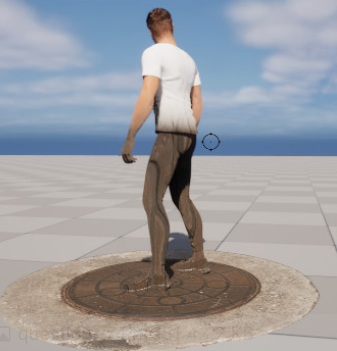
만약 데칼을 스폰에 성공했다면 이상한점을 목격할수있을것이다
이렇게 데칼이 플레이어나 다른 대상에까지 영향을 미치는 현상을 볼수있다
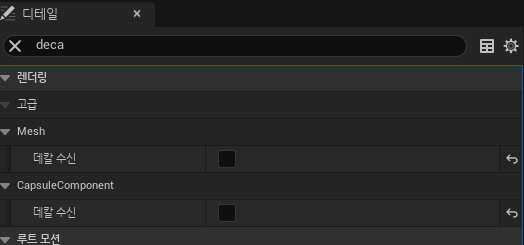
보이고싶지않은 대상의 Detail창에서 데칼 수신을 Off 해버리면 문제는 해결된다
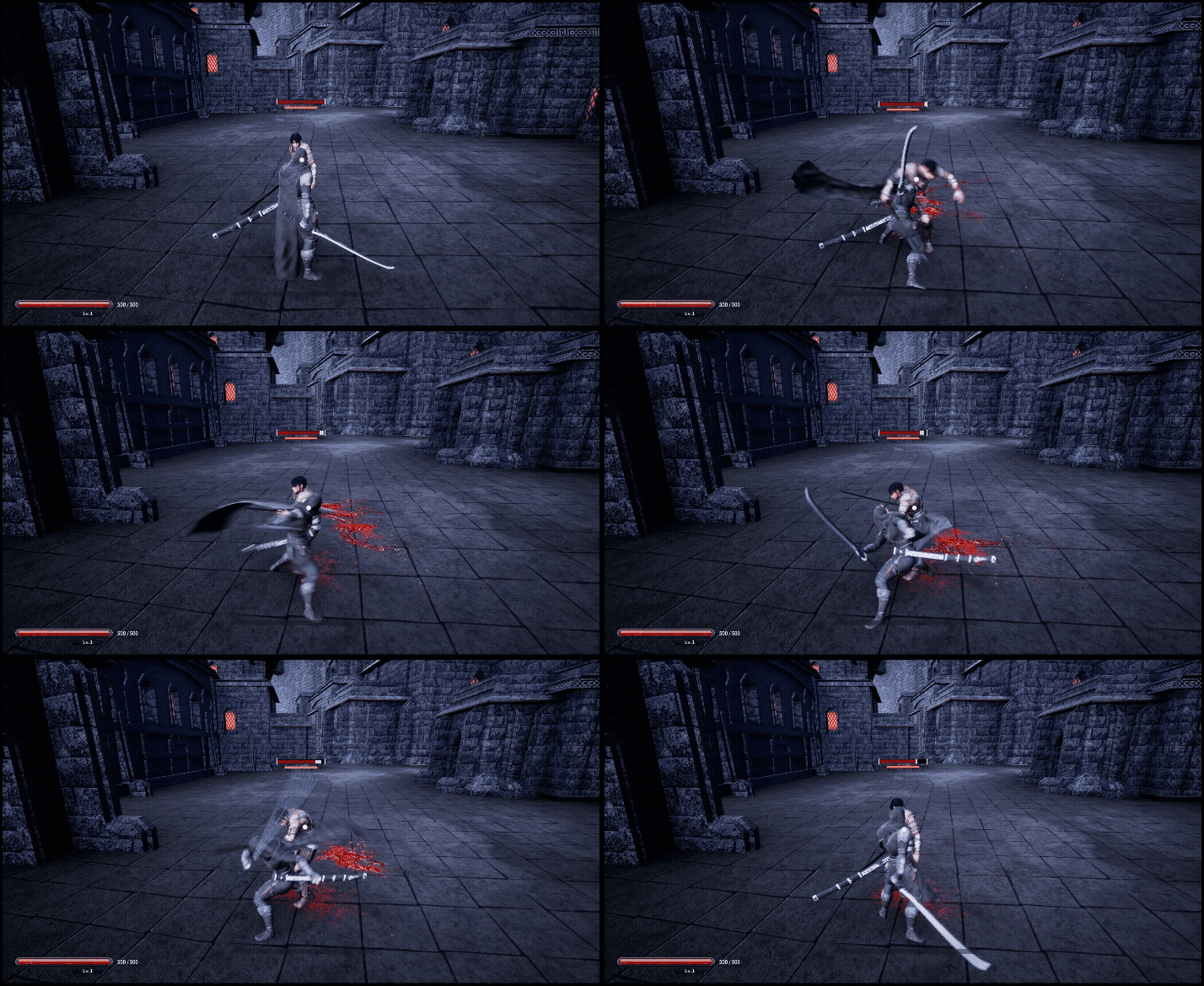
결과
맞은 곳에서 피가 튀기고
바닥에 피자국 데칼이 묻습니다
'Unreal 프로젝트 다이어리 > 두번째 프로젝트' 카테고리의 다른 글
| Unreal - Loot Notification 위젯 (0) | 2025.12.14 |
|---|---|
| Unreal - HitStop(히트스탑) & Hud(허드) (1) | 2025.12.12 |
| Unreal - 스킬 트리 (0) | 2025.12.10 |
| Unreal - 스탯창 (0) | 2025.12.02 |
| Unreal - 세이브 게임 (0) | 2025.12.02 |