구현내용
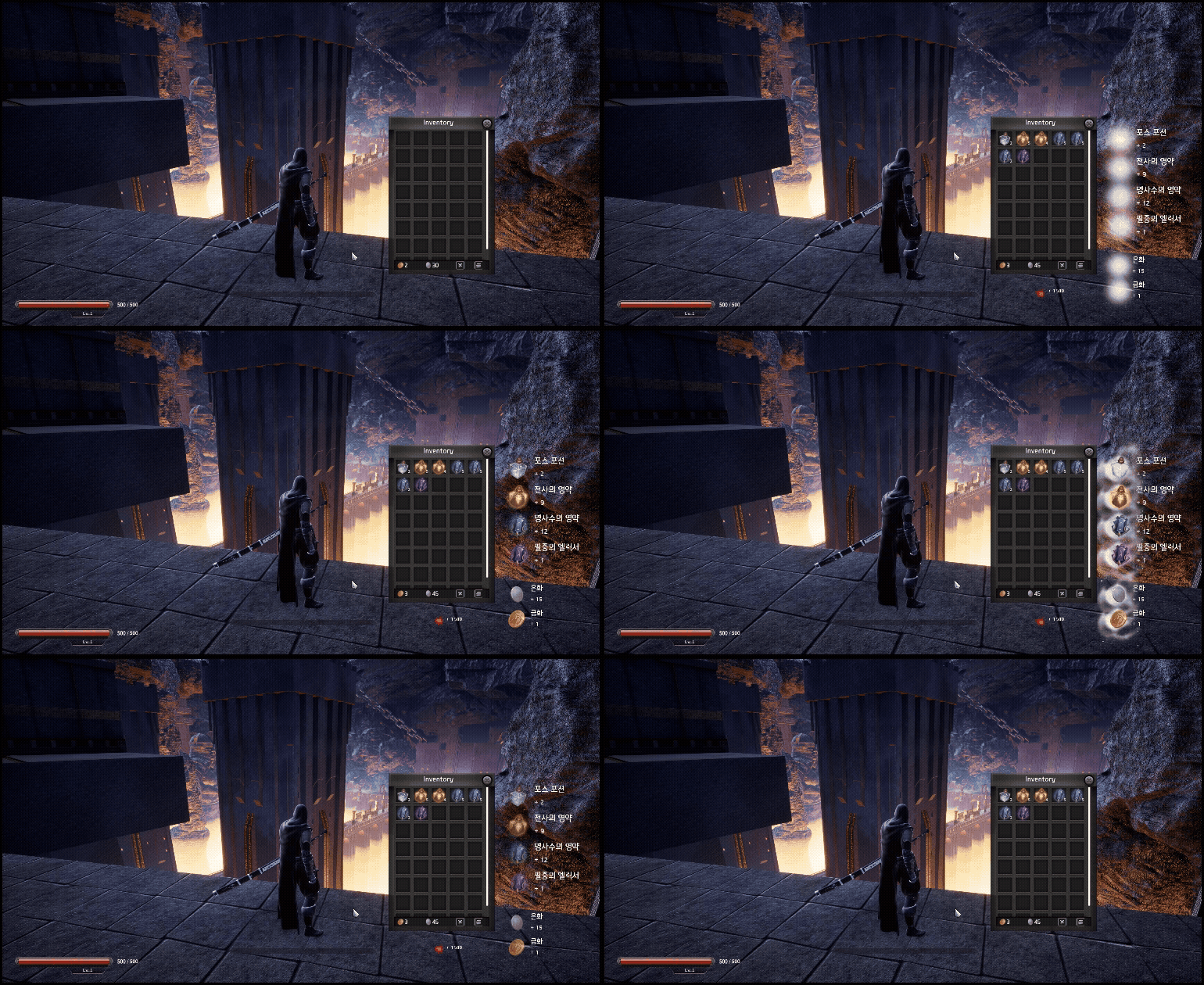
아이템, 재화 또는 포인트를 획득했을때 획득했다라는걸 시각적으료 표현해주는
루팅 노티피케이션 구현
간단하게 메이플스토리의 재화획득창이라고 생각하면될꺼같습니다
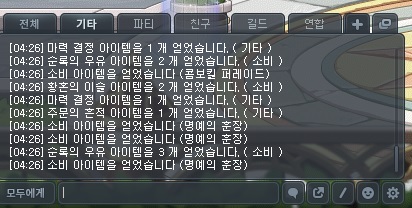
구현목적
게임플레이하면서 플레이어가 여러가지 방법으로 아이템, 재화를 파밍하게되는데
어떤걸 얼마나 파밍했는지 직접 인벤토리나 장비창을 열어서 확인하기 너무 불편하여
이벤트가 발생했을때 시각적으로 보여주기위함
구상도 / 컨셉
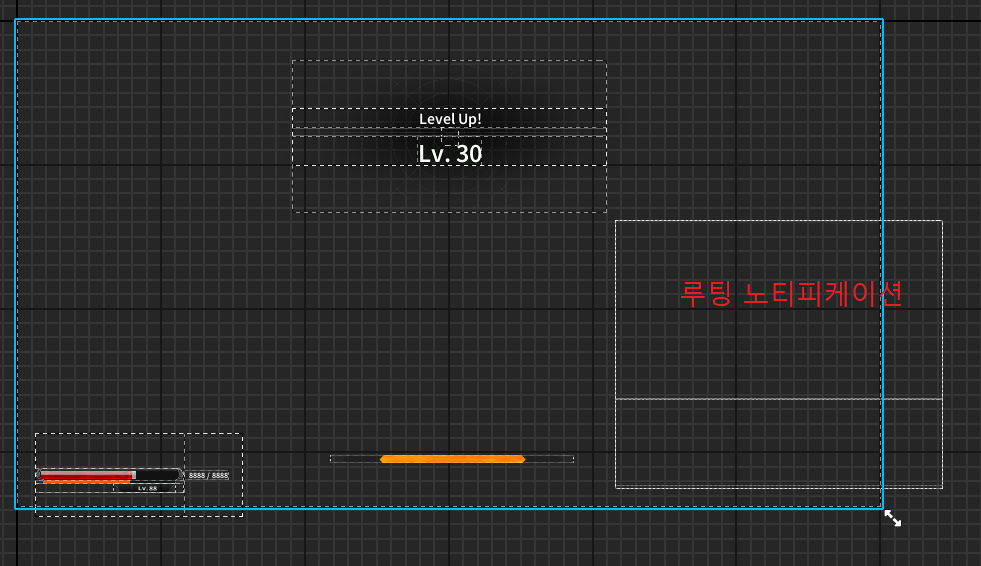
노티피케이션 위젯의 초기 구상도입니다
총3가지의 슬롯으로 이루어져있습니다
아이템류가 띄워지는 아이템 슬롯, 재화류가 띄워지는 재화슬롯, 포인트가 띄워지는 포인트 슬롯
이렇게 3가지로 이루어져있습니다
아이템을 먹으면 아이템은 최대4개, 재화는 최대2개, 포인트는 최대1개의 칸으로이루어져있으며
해당 칸을 넘으면 해당 먼저 들어온 슬롯의 표기 이벤트가 다 끝난 다음 표기됩니다

구현에 사용한 클래스
| 사용한 클래스 | 사용목적 |
| RootingItemSlot(위젯) | RootingNotification위젯에 표현될 아이템 슬롯 한 칸 을 표현하는 위젯 |
| RootingNotification(위젯) | RootingItemSlot위젯을 각 슬롯에 맞게 표기하는 컨테이너 역할 위젯 |
| StatComponent(액터컴포넌트) | 플레이어의 스탯관련 액터컴포넌트, 플레이어가 포인트를 얻으면 RootingNotification의 큐 슬롯에 추가하는 역할 |
| InventoryComponent(액터컴포넌트) | 플레이어의 인벤토리 관련 액터컴포넌트, 플레이어가 아이템, 재화를 얻으면 RootingNotification의 큐 슬롯에 추가하는 역할 |
| ItemData(데이터 strcut) | 아이템의 ID, 이름 등등의 데이터를 가지고있는 데이터구조체 |
구현
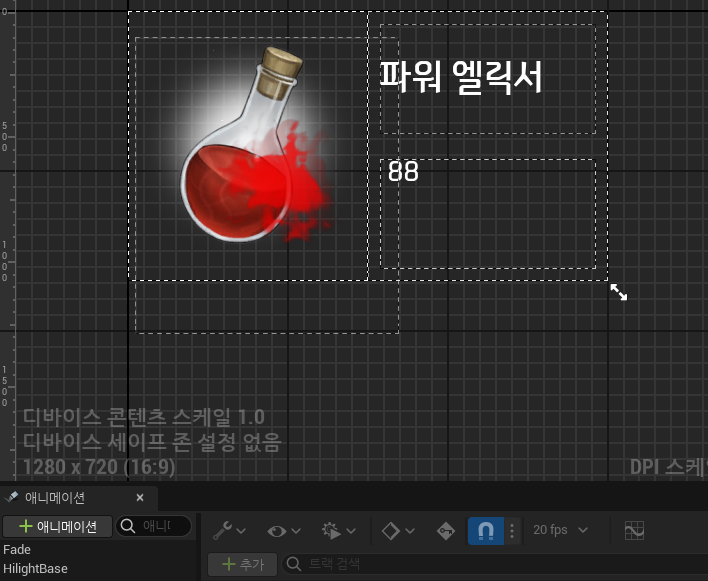
먼저 RootingItemSlot 즉 슬롯 을 만들어주었습니다
슬롯에서는 아이템의 이름, 갯수, 이미지를 표기하며
Fade애니메이션 -> 하이라이트애니메이션 -> Fade애니메이션 역순 으로 연출됩니다
void URootingItemSlot::NativeConstruct()
{
	Super::NativeConstruct();

	FWidgetAnimationDynamicEvent finishFadeEv;
	finishFadeEv.BindDynamic(this, &URootingItemSlot::OnRootingAnimFinished_Internal);
	BindToAnimationFinished(Fade, finishFadeEv);
	BindToAnimationFinished(HilightBase, finishFadeEv);
}

//애니메이션순서 Fade(정방향) -> HilightBase -> Fade(역방향)
void URootingItemSlot::UpdateRootingItemSlotWidget(const FString& itemName, int32 itemCount, UTexture2D* itemImage, FLinearColor useColor)
{
	TextBlock_ItemName->SetText(FText::FromString(itemName));

	FString countText = FString::Printf(TEXT("+ %d"), itemCount);
	TextBlock_ItemCount->SetText(FText::FromString(countText));

	Image_Item->SetBrushFromTexture(itemImage);

	bIsFadingOut = false;

	PlayAnimation(Fade, 0.f, 1, EUMGSequencePlayMode::Forward, 3.f);

}

void URootingItemSlot::OnRootingAnimFinished_Internal()
{
	if (!bIsFadingOut && GetAnimationCurrentTime(Fade) >= Fade->GetEndTime())
	{
		bIsFadingOut = true;
		PlayAnimation(HilightBase, 0.f, 1, EUMGSequencePlayMode::Forward, 2.3f);
	}
	else if (bIsFadingOut && GetAnimationCurrentTime(HilightBase) >= HilightBase->GetEndTime())
	{
		PlayAnimation(Fade, 0.f, 1, EUMGSequencePlayMode::Reverse, 4.5f);
	}
	else if (bIsFadingOut && GetAnimationCurrentTime(Fade) <= 0.f)
	{
		bIsFadingOut = false;
		onSlotAnimFinished.Broadcast(this);
	}
}
RootingNotification위젯구현입니다
사용할 클래스를 선언해줍니다
UENUM()
enum class ERootingBoxType : uint8
{
	Item,
	CurrencyMain,
	CurrencyExtra
};

USTRUCT()
struct FRootingItemData
{
	GENERATED_BODY()

	UPROPERTY()
	FString name;

	UPROPERTY()
	int32 count = 0;

	UPROPERTY()
	UTexture2D* icon = nullptr;

	UPROPERTY()
	FLinearColor color;

	UPROPERTY()
	bool bIsCurrency = false;

	UPROPERTY()
	ECurrencyType currencyType = ECurrencyType::Lacrima;

	FRootingItemData() {}
	FRootingItemData(const FString&  useName, int32 useCount, UTexture2D* useIcon, FLinearColor useColor)
		: name(useName), count(useCount), icon(useIcon), color(useColor) {}

};
헬퍼함수와 사용할 큐를 선언해줍니다
public:
	UFUNCTION()
	void EnqueueRootingItem(ERootingBoxType rootType, const FRootingItemData& data);

public:
	TQueue<FRootingItemData> queue_Item;
	TQueue<FRootingItemData> queue_CurrencyMain;
	TQueue<FRootingItemData> queue_currencyExtra;

	TMap<class URootingItemSlot*, ERootingBoxType> activeSlotTypeMap;

	int32 maxRootingSlots = 4;
	int32 maxCurrencyMainSlots = 2;
	int32 maxCurrencyExtraSlots = 1;

	//헬퍼함수 모음-----------------------------------------------
public:
	void TryDisplayNextForType(ERootingBoxType boxType);
	bool DequeueForType(ERootingBoxType boxType, FRootingItemData& outData);

	UWrapBox* GetWrapBoxByType(ERootingBoxType boxType) const;
	int32 GetMaxSlotsByType(ERootingBoxType boxType) const;


	UFUNCTION()
	void OnSlotAnimFinished(URootingItemSlot* finishedSlot);
해당 슬롯마다 큐를 만들고 슬롯위젯의 애니메이션 과 바인드한뒤
애니메이션이 끝나면 해당 이벤트로 슬롯의 큐 이벤트발생, 소멸을 정의하였습니다
EnqueueRootingItem함수를 호출하여 타입과 데이터를 넣으면 해당 위치의 랩박스/ 큐슬롯으로
큐를 추가할수있습니다
void URootingNotification::EnqueueRootingItem(ERootingBoxType rootType, const FRootingItemData& data)
{
	switch (rootType)
	{
	case ERootingBoxType::Item:
		queue_Item.Enqueue(data);
		break;
	case ERootingBoxType::CurrencyMain:
		queue_CurrencyMain.Enqueue(data);
		break;
	case ERootingBoxType::CurrencyExtra:
		queue_currencyExtra.Enqueue(data);
		break;
	default:
		break;
	}

	TryDisplayNextForType(rootType);
}

void URootingNotification::TryDisplayNextForType(ERootingBoxType boxType)
{
	FRootingItemData nextData;
	if (!DequeueForType(boxType, nextData))
		return;
	UWrapBox* targetWrap = GetWrapBoxByType(boxType);
	if (!targetWrap || !itemSlotClass)
		return;

	int32 maxSlot = GetMaxSlotsByType(boxType);
	if (targetWrap->GetChildrenCount() >= maxSlot)
	{
		switch (boxType)
		{
		case ERootingBoxType::Item:
			queue_Item.Enqueue(nextData);
			break;
		case ERootingBoxType::CurrencyMain:
			queue_CurrencyMain.Enqueue(nextData);
			break;
		case ERootingBoxType::CurrencyExtra:
			queue_currencyExtra.Enqueue(nextData);
			break;
		}
		return;
	}

	URootingItemSlot* newSlot = CreateWidget<URootingItemSlot>(GetWorld(), itemSlotClass);

	if (nextData.bIsCurrency && nextData.currencyType == ECurrencyType::Lacrima)
	{
		newSlot->SetCurrencyLacrima(nextData.count);
		newSlot->SetLacrimaMode();
	}
	else
	{
		// Gold/Silver 아이콘 그대로 보여주기
		newSlot->SetItemData(nextData);
	}

	//newSlot->SetItemData(nextData);

	targetWrap->AddChild(newSlot);
	newSlot->SynchronizeProperties();
	targetWrap->InvalidateLayoutAndVolatility();

	activeSlotTypeMap.Add(newSlot, boxType);
	newSlot->onSlotAnimFinished.AddDynamic(this, &URootingNotification::OnSlotAnimFinished);
}

bool URootingNotification::DequeueForType(ERootingBoxType boxType, FRootingItemData& outData)
{
	switch (boxType)
	{
	case ERootingBoxType::Item:
		return queue_Item.Dequeue(outData);
	case ERootingBoxType::CurrencyMain:
		return queue_CurrencyMain.Dequeue(outData);
	case ERootingBoxType::CurrencyExtra:
		return queue_currencyExtra.Dequeue(outData);
	default:
		return false;
	}
}

UWrapBox* URootingNotification::GetWrapBoxByType(ERootingBoxType boxType) const
{
	switch (boxType)
	{
	case ERootingBoxType::Item:
		return WrapBox_RootingItem;
	case ERootingBoxType::CurrencyMain:
		return WrapBox_CurrencyMain;
	case ERootingBoxType::CurrencyExtra:
		return WrapBox_CurrencyExtra;
	default:
		return nullptr;
	}
}

int32 URootingNotification::GetMaxSlotsByType(ERootingBoxType boxType) const
{
	switch (boxType)
	{
	case ERootingBoxType::Item:
		return maxRootingSlots;
	case ERootingBoxType::CurrencyMain:
		return maxCurrencyMainSlots;
	case ERootingBoxType::CurrencyExtra:
		return maxCurrencyExtraSlots;
	default:
		return 0;
	}
}

void URootingNotification::OnSlotAnimFinished(URootingItemSlot* finishedSlot)
{
	if (!finishedSlot)
		return;

	if (!activeSlotTypeMap.Contains(finishedSlot))
		return;
	ERootingBoxType boxType = activeSlotTypeMap[finishedSlot];

	// WrapBox에서 제거
	UWrapBox* targetWrap = GetWrapBoxByType(boxType);
	if (targetWrap)
		finishedSlot->RemoveFromParent();

	// activeSlotTypeMap에서 제거
	activeSlotTypeMap.Remove(finishedSlot);

	// 큐에서 다음 아이템 표시
	TryDisplayNextForType(boxType);
}
호출의 방식은 이와같습니다
//InventoryComponent(아이템)
void UInventoryComponent::ShowRootingItem(const FItemData& itemData, int32 count)
{
	FRootingItemData data(itemData.itemName, count, itemData.itemIcon, itemData.bannerColor);
	mainCon->mainWidget->rootingNotiWidgets->EnqueueRootingItem(ERootingBoxType::Item, data);
}

//InventoryComponent(재화)
void UInventoryComponent::AddSilver(int32 amount)
{
	currentSilver += amount;

	UTexture2D* silverIcon = nullptr;
	FLinearColor silverColor = FLinearColor::White;

	if (itemDataMap.Contains(16))
	{
		const FItemData& goldData = itemDataMap[16];
		silverIcon = goldData.itemIcon;
		silverColor = goldData.bannerColor;

		mainCon->mainWidget->rootingNotiWidgets->EnqueueRootingItem(ERootingBoxType::CurrencyMain,
			FRootingItemData(goldData.itemName, amount, silverIcon, silverColor)
		);
	}
	onCurrencyUpdated.Broadcast();
}

//statcomponent(포인트)
void UStatComponent::ShowRootingCurrency(const FItemData& itemData, int32 count, bool bMain)
{
	FRootingItemData data(itemData.itemName, count, itemData.itemIcon, itemData.bannerColor);
	data.bIsCurrency = true;
	data.currencyType = ECurrencyType::Lacrima;

	if (bMain)
		mainCon->mainWidget->rootingNotiWidgets->EnqueueRootingItem(ERootingBoxType::CurrencyMain, data);
	else
		mainCon->mainWidget->rootingNotiWidgets->EnqueueRootingItem(ERootingBoxType::CurrencyExtra, data);

}
사용하기위해 메인위젯에 추가!
결과
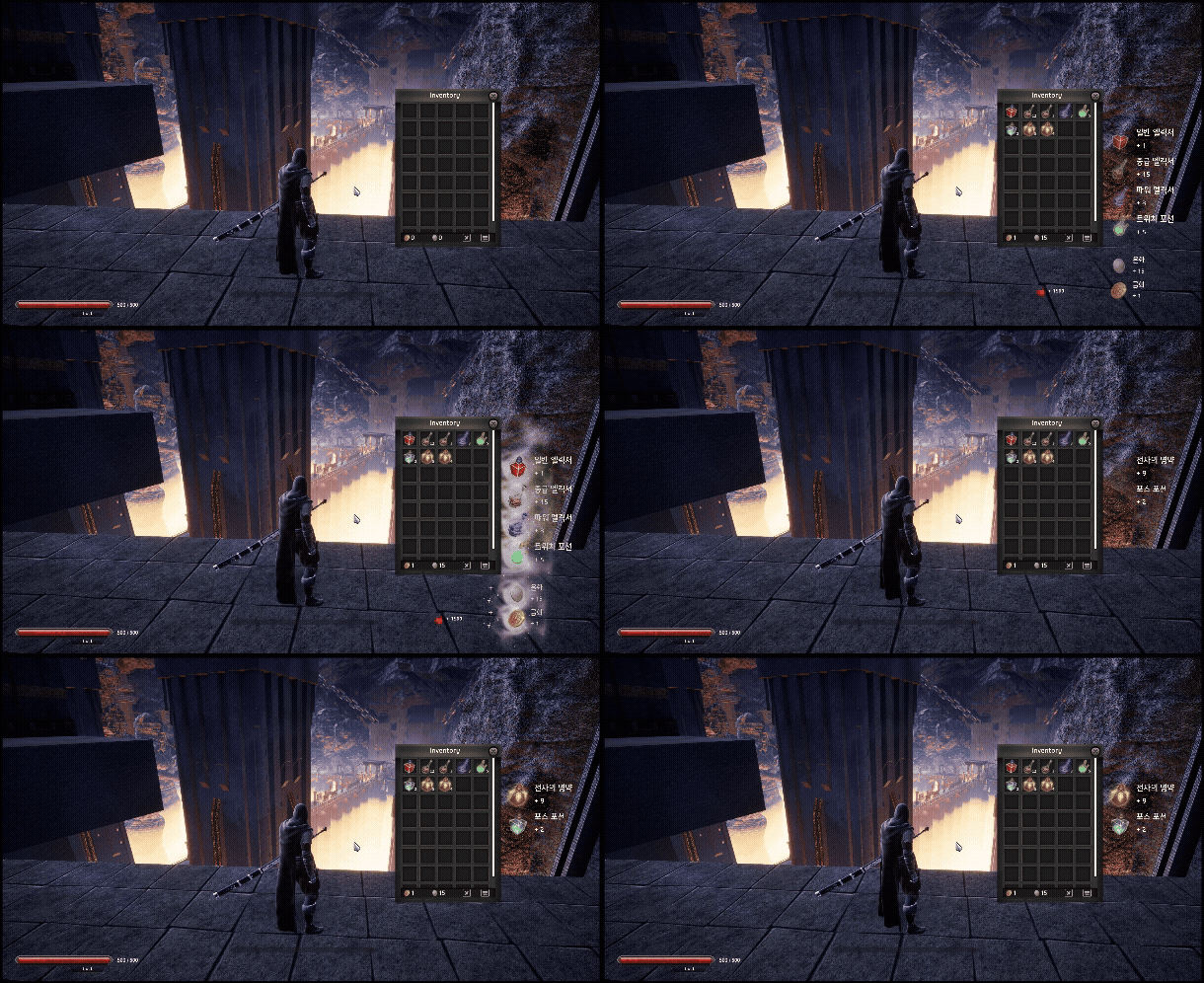
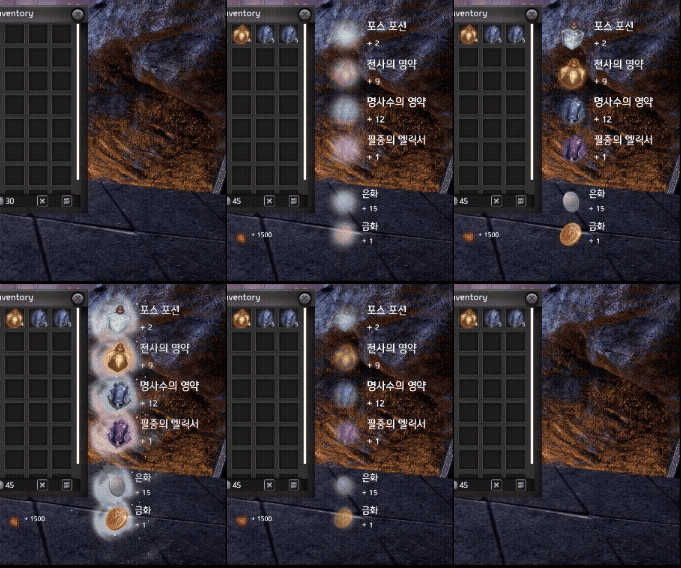
--구현하면서
UI도 정말 로직을 갖추면서 만들려니 점점 복잡해지는거같습니다
쉬운게없습니다..ㅠ
'Unreal 프로젝트 다이어리 > 두번째 프로젝트' 카테고리의 다른 글
| Unreal - 상호작용 프롬프트 (4) | 2025.12.19 |
|---|---|
| Unreal - 상점 Npc (1) | 2025.12.17 |
| Unreal - HitStop(히트스탑) & Hud(허드) (1) | 2025.12.12 |
| Unreal - Blood Decal (피 튀기기) (0) | 2025.12.10 |
| Unreal - 스킬 트리 (0) | 2025.12.10 |