구현내용
게임중 진행되는 세이브되어야하는 데이터들의 값 저장
구현목적
언리얼에서는 게임을 실행할 때마다 이전 인스턴스가 모두 초기화되기 때문에, 별도의 조치를 취하지 않으면 게임 데이터가 저장되지 않습니다 인벤토리, 스탯 등등 여러가지를 구현하다보니 값의 저장이 필요하게 되어 구현하였습니다
사용클래스
| USaveFile | 실제 저장되는 데이터를 담는 컨테이너 (USaveGame) |
| UProjectGameInstance | 게임이 실행되는동안 유지되는 전역 데이터 저장기능 인스턴스 (GameInstance) |
| SaveManager | 세이브 / 로드 로직을 관리하는 매니저 ProjectGameInstance가 소유하며 저장 / 로그 함수 구현 |
구현
SaveGame 클래스를 추가해줍니다
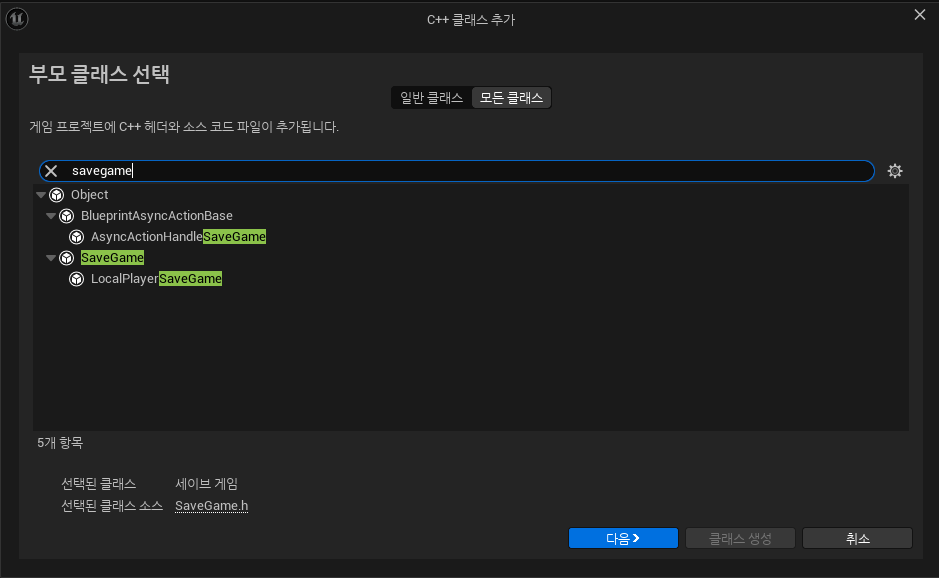
저장해야하는값들을 저장합니다
#pragma once

#include "CoreMinimal.h"
#include "GameFramework/SaveGame.h"
#include "SaveFile.generated.h"

USTRUCT(BlueprintType)
struct FSaveItemData
{
	GENERATED_BODY()

	UPROPERTY()
	FString itemID;

	UPROPERTY()
	int32 itemCount;
};

UCLASS()
class PORTFOLIOMS_API USaveFile : public USaveGame
{
	GENERATED_BODY()

public:

	//캐릭 위치, 방향
	UPROPERTY()
	FVector playerLoc;

	UPROPERTY()
	FRotator playerRot;

	//캐릭 스탯
	UPROPERTY()
	float currentHp;

	UPROPERTY()
	float maxHp;

	UPROPERTY()
	float currentPosture;

	UPROPERTY()
	float currentExp;

	UPROPERTY()
	int32 playerLevel;

	//크리티컬 & 공격속도
	UPROPERTY()
	float currentCriticalRate;

	UPROPERTY()
	float currentAttackSpeed;

	//스탯어빌리티
	UPROPERTY()
	int32 currentStatPoint;
    .... 이하생략
세이브 매니저의 구현
UCLASS()
class PORTFOLIOMS_API USaveManager : public UObject
{
	GENERATED_BODY()

public:
	UPROPERTY()
	USaveFile* currentSave;

	UFUNCTION()
	bool SaveGame();

	UFUNCTION()
	bool LoadGame();

	UFUNCTION()
	void NewGame();

	UFUNCTION()
	void Initalize();

	UPROPERTY()
	UDataTable* characterBaseTable;

public:
	USaveFile* GetCurrentSaveFile() const { return currentSave; }
private:
	FString saveSlotName = TEXT("SaveFile");
	uint32 userIdx = 0;

};
bool USaveManager::SaveGame()
{
	if (!currentSave)
		return false;

	return UGameplayStatics::SaveGameToSlot(currentSave, saveSlotName, userIdx);
}

bool USaveManager::LoadGame()
{
	if (UGameplayStatics::DoesSaveGameExist(saveSlotName, userIdx))
	{
		currentSave = Cast<USaveFile>(UGameplayStatics::LoadGameFromSlot(saveSlotName, userIdx));
		return currentSave != nullptr;
	}
	return false;
}

void USaveManager::NewGame()
{
	currentSave = Cast<USaveFile>(UGameplayStatics::CreateSaveGameObject(USaveFile::StaticClass()));

	if (!characterBaseTable)
		return;

	const FString ContextString(TEXT("Character Base Stat"));
	FCharacterBaseStat* baseStat = characterBaseTable->FindRow<FCharacterBaseStat>(FName("BaseStat"), ContextString);
	if (!baseStat)
		return;

	//기본값
	currentSave->gold = 0;
	currentSave->silver = 0;
	currentSave->currentHp = baseStat->baseHp;
	currentSave->currentPosture = 0;
	currentSave->playerLevel = 1;
	currentSave->inventoryItems.Empty();
}

void USaveManager::Initalize()
{
	if (LoadGame())
		return;

	NewGame();
}
해당코드로 외부에 세이브파일을 만들게됩니다
UGameplayStatics::SaveGameToSlot(currentSave, saveSlotName, userIdx);
해당 스탯컴포넌트에서 불러오기 를 구현합니다
//불러오기
void UStatComponent::InitStats(USaveFile* saveData)
{
	if (!characterBaseTable)
		return;

	const FString ContextString(TEXT("Character Base Stats"));
	FCharacterBaseStat* baseStat = characterBaseTable->FindRow<FCharacterBaseStat>(FName("BaseStat"), ContextString);

	cachedBaseStat = *baseStat;
	if (saveData)
	{
		level = saveData->playerLevel;
		currentExp = saveData->currentExp;
		CalcExpNextLev();
		currentCriticalRate = saveData->currentCriticalRate;
		currentAttackSpeed = saveData->currentAttackSpeed;
		currentStatPoint = saveData->currentStatPoint;
		totalStatPoint = saveData->totalStatPoint;
		currentAbilityPoint = saveData->currentAbilityPoint;
		totalAbilityPoint = saveData->totalAbilityPoint;
		statUpgradeStrength = saveData->statUpgradeStrength;
		statUpgradeSpeed = saveData->statUpgradeSpeed;
		statUpgradePower = saveData->statUpgradePower;
		statUpgradeCritical = saveData->statUpgradeCritical;
		tempStatUpgradeStrength = saveData->tempStatUpgradeStrength;
		tempStatUpgradeSpeed = saveData->tempStatUpgradeSpeed;
		tempStatUpgradePower = saveData->tempStatUpgradePower;
		tempStatUpgradeCritical = saveData->tempStatUpgradeCritical;
		tempNeedLacrimaCount = saveData->tempNeedLacrimaCount;
		tempCurrentStatPoint = saveData->tempCurrentStatPoint;
		currentLacrima = saveData->currentLacrima;
		needUpgradeLacrimaCount = saveData->needUpgradeLacrimaCount;
		needUpgradeLacrimaCount = 300;
	}
	else
	{
		needUpgradeLacrimaCount = 300;
		level = 1;
	}
	ApplyLevelStat();
	ApplySavedStatBonus();

	//풀피로 세팅
	currentHp = stats[EBaseStatType::Hp].EntryTotal();

	//UI업뎃
	UpdateCurrentStats();
	onLevelChanged.Broadcast(level);
	onExpChanged.Broadcast(currentExp, expNextLevel, level);
}
BeginPlay에서 저장 데이터를 임시로 담을 포인터로 선언하여 게임 시작시
저장 데이터를 불러와 캐릭터 상태를 초기화해줍니다
void UStatComponent::BeginPlay()
{
	Super::BeginPlay();

	USaveFile* saveData = nullptr;
	if (UProjectGameInstance* gameIst = Cast<UProjectGameInstance>(GetWorld()->GetGameInstance()))
	{
		if (gameIst->saveManager)
			saveData = gameIst->saveManager->GetCurrentSaveFile();
	}
	InitStats(saveData);
}
저장하기를 구현해줍니다
해당 함수는 저장해야할때 호출하면됩니다
//save 저장하기
void UStatComponent::SaveStat(USaveFile* saveData)
{
	if (!saveData)
		return;

	saveData->playerLevel = level;
	saveData->currentHp = currentHp;
	saveData->currentExp = currentExp;
	saveData->currentCriticalRate = currentCriticalRate;
	saveData->currentAttackSpeed = currentAttackSpeed;
	saveData->currentStatPoint = currentStatPoint;
	saveData->totalStatPoint = totalStatPoint;
	saveData->currentAbilityPoint = currentAbilityPoint;
	saveData->totalAbilityPoint = totalAbilityPoint;
	saveData->statUpgradeStrength = statUpgradeStrength;
	saveData->statUpgradeSpeed = statUpgradeSpeed;
	saveData->statUpgradePower = statUpgradePower;
	saveData->statUpgradeCritical = statUpgradeCritical;
	saveData->tempStatUpgradeStrength = tempStatUpgradeStrength;
	saveData->tempStatUpgradeSpeed = tempStatUpgradeSpeed;
	saveData->tempStatUpgradePower = tempStatUpgradePower;
	saveData->tempStatUpgradeCritical = tempStatUpgradeCritical;
	saveData->tempNeedLacrimaCount = tempNeedLacrimaCount;
	saveData->tempCurrentStatPoint = tempCurrentStatPoint;
	saveData->currentLacrima = currentLacrima;
	saveData->needLacrimaCount = needLacrimaCount;
	saveData->needUpgradeLacrimaCount = needUpgradeLacrimaCount;

}
BeginPlay에서 InitStats를 실행하면, 세이브 파일의 데이터를 받아서
컴포넌트 내 각 스탯과 값들에 동기화합니다.
이후 SaveStat 함수를 사용하면, 현재 컴포넌트의 상태를 세이브 파일에 저장할 수 있습니다.
배열로 저장되는 아이템은 인벤토리 컴포넌트 내에서 이와같이 저장 / 로드 하였습니다
void UInventoryComponent::LoadInventoryToSave(USaveFile* saveData)
{
	if (!saveData)
		return;

	items.SetNum(baseInvenSlotCount);
	for (FItemSlot& slot : items)
		slot.Clear();

	for (const FSaveItemData& saveItem : saveData->inventoryItems)
	{
		int32 itemID = FCString::Atoi(*saveItem.itemID);
		AddItem(itemID, saveItem.itemCount);
	}
}

void UInventoryComponent::SaveInventoryToSave(USaveFile* saveData)
{
	if (!saveData)
		return;

	saveData->inventoryItems.Empty();
	for (const FItemSlot& slot : items)
	{
		if (!slot.isEmpty())
		{
			FSaveItemData saveItem;
			saveItem.itemID = FString::FromInt(slot.itemID);
			saveItem.itemCount = slot.inCount;
			saveData->inventoryItems.Add(saveItem);
		}
	}
}
최종 세이브 호출은 이와 같습니다
void UCubeWidget::ButtonClickSave()
{
	if (!saveData)
		saveData = gameIst->saveManager->GetCurrentSaveFile();

	if (!saveData)
		return;

	statComp->SaveStat(saveData);

	invenComp->SaveInventoryToSave(saveData);
	gameIst->saveManager->SaveGame();
}
결과
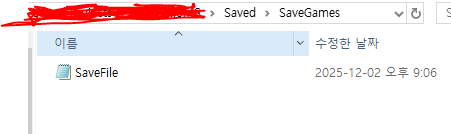
저장할시 Saved -> SaveGame 폴더에 세이브파일이 갱신됩니다
새로하기를 원하면 해당 파일을 삭제하시면됩니다
큐브에 인터렉션하여 저장할수 있도록 설계하였습니다
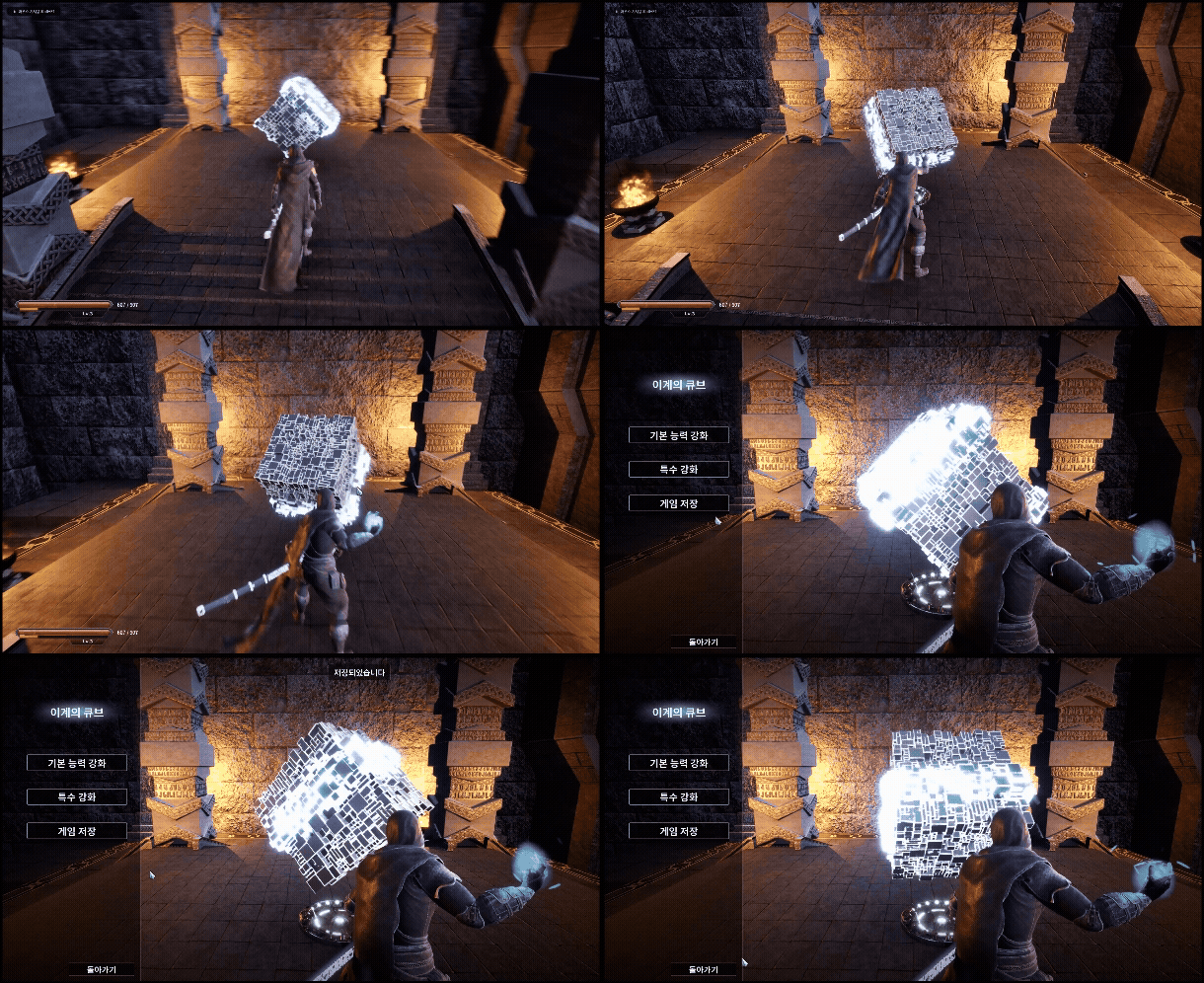
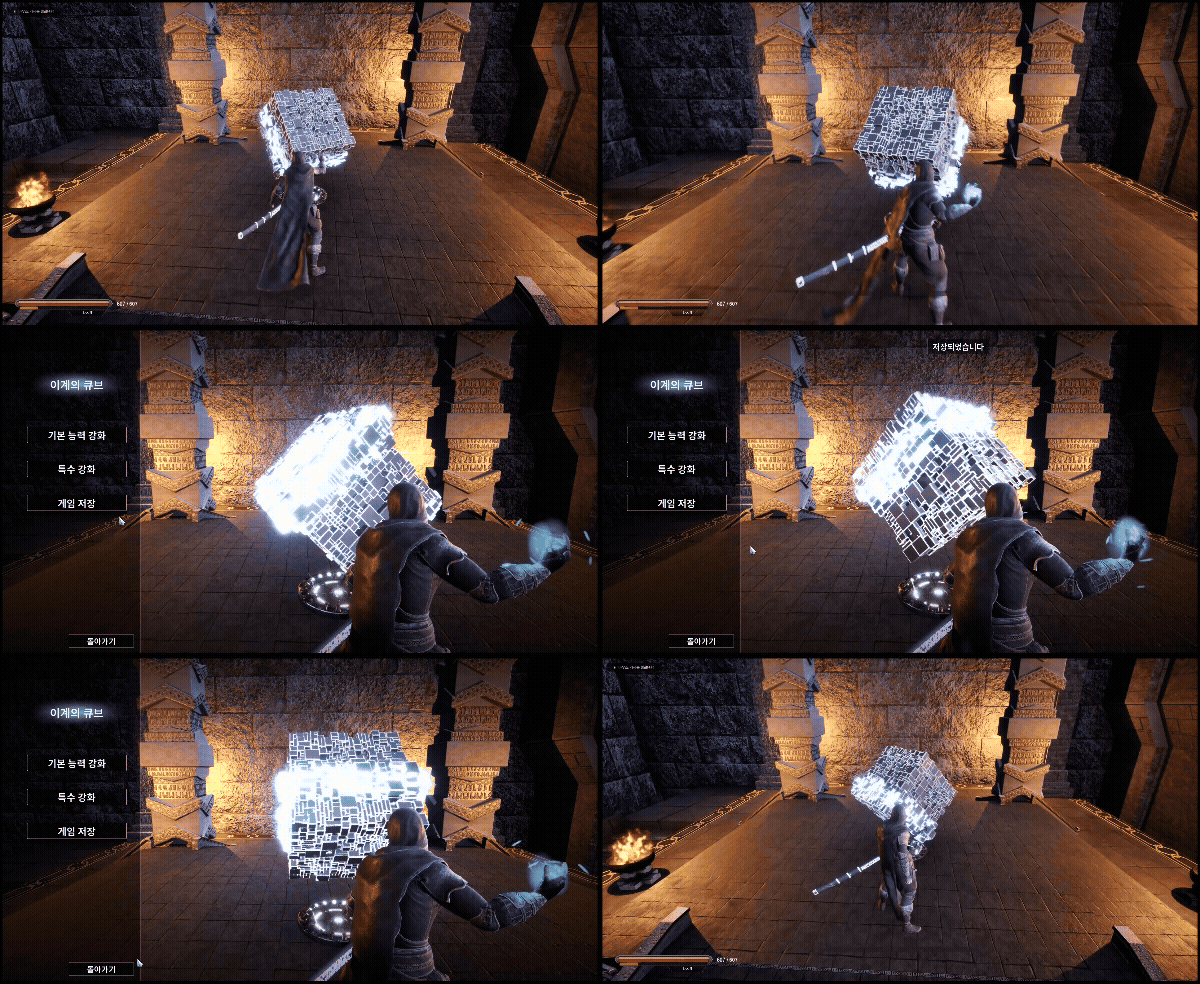
저장영상
'Unreal 프로젝트 다이어리 > 두번째 프로젝트' 카테고리의 다른 글
| Unreal - 스킬 트리 (0) | 2025.12.10 |
|---|---|
| Unreal - 스탯창 (0) | 2025.12.02 |
| Unreal - 경험치, 레벨업 구현하기 (0) | 2025.12.02 |
| Unreal - 데미지 오버레이 (0) | 2025.12.01 |
| Unreal - 인벤토리(5-2) (UI 디테일 추가) (0) | 2025.11.29 |