파쿠르의 수행조건이 될 "방해물" 의 인지를 해보겠습니다
저의 제작 방식은 이와 같습니다
1. ActorComponent인 ParkourComponent라는 독립형 캐릭터 컴포넌트를 제작
2. 해당 동작 데이터 관리는 DataTable기반
3. 라인트레이스를 이용한 환경 인식 즉 "파쿠르 가능한 지형인지" 감지
이렇게 모듈화하여 제작하였습니다
먼저 파쿠르 가능한 지형인지 에 대한 라인트레이서 히트를 할 채널을 따로 만들어주었습니다
트레이스의 채널은 Ignore 프리셋의 Parkour 프리셋은 모두 Block처리하여주었습니다
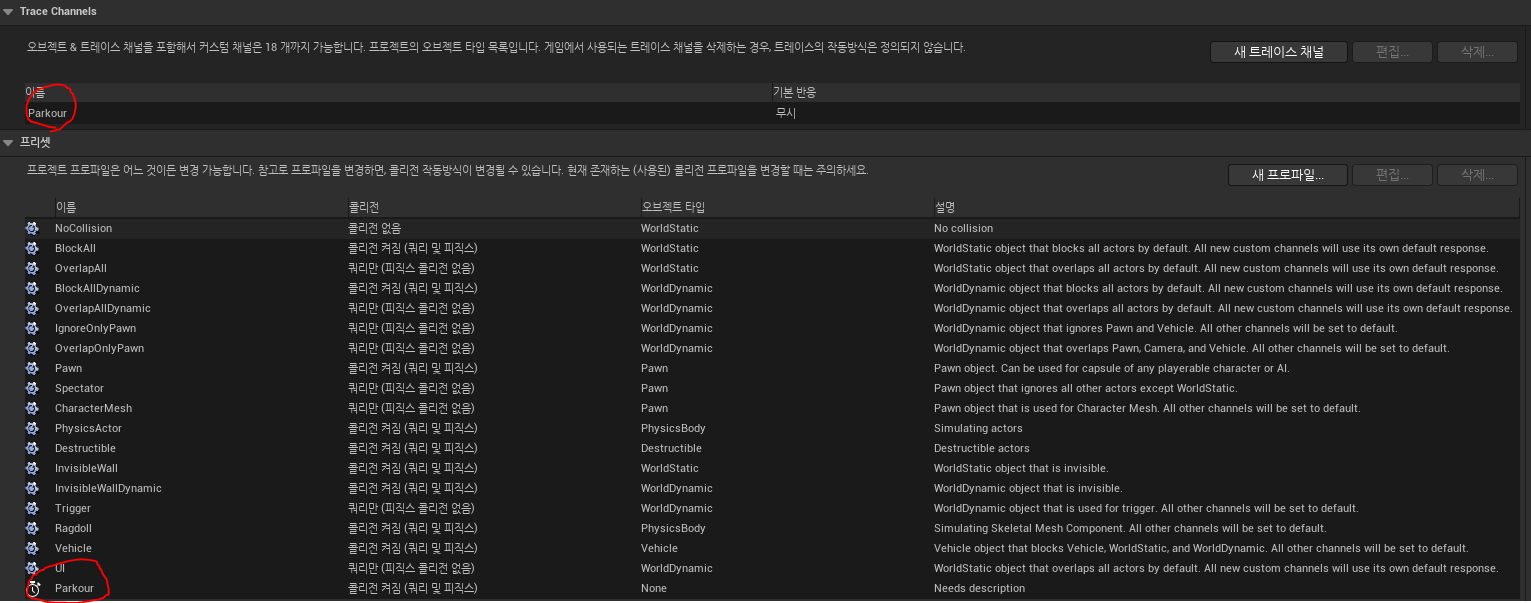
캐릭터 앞에 벽이나 장애물이 있는지 라인트레이스를 쏴서 확인합니다
기준점은 ArrowComponent 기준입니다
void UCParkourComponent::LineTrace(EParkourArrowType inType)
{
	UArrowComponent* arrow = arrows[(int32)inType];
	FLinearColor color = FLinearColor(arrow->ArrowColor);

	FTransform transform = arrow->GetComponentToWorld();

	FVector start = transform.GetLocation();
	FVector end = start + ownerCharacter->GetActorForwardVector() * traceDistance;

	TArray<AActor*> ignores;
	ignores.Add(ownerCharacter);

	UKismetSystemLibrary::LineTraceSingle(GetWorld(), start, end, ETraceTypeQuery::TraceTypeQuery3, false,
		ignores, debugType, hitResults[(int32)inType], true, color, FLinearColor::White);
}
파쿠르의 종류를 정의할 enum클래스입니다
//파쿠르 추적 화살표 타입
UENUM(BlueprintType)
enum class EParkourArrowType : uint8
{
	Center = 0, Up, Down, Left, Right, Forward, Max,
};

//파쿠르 동작 타입
UENUM(BlueprintType)
enum class EParkourType : uint8
{
	Climb = 0, Slide, Short, Normal, Wall, Max,
};
라인트레이서로 장애물을 탐지하여 크기, 거리, 방향 정보를 계산하였습니다
TickComponent에서 실행됩니다
void UCParkourComponent::CheckTrace_Center()
{
	EParkourArrowType type = EParkourArrowType::Center;
	LineTrace(type);

	const FHitResult& hitResult = hitResults[(int32)type];
	if (hitResult.bBlockingHit)
		return;

	AActor* hitActor = hitResult.GetActor();
	if (!hitActor)
		return;

	UStaticMeshComponent* mesh = hitActor->FindComponentByClass<UStaticMeshComponent>();
	if (!mesh)
		return;

	hitObstracle = hitResult.GetActor();

	FVector minBound, maxBound;
	mesh->GetLocalBounds(minBound, maxBound); //부피

	float x = FMath::Abs(minBound.X - maxBound.X);
	float y = FMath::Abs(minBound.Y - maxBound.Y);
	float z = FMath::Abs(minBound.Z - maxBound.Z);
	hitObstracleExtent = FVector(x, y, z);

	hitDistance = hitResult.Distance;


	toFrontYaw = UKismetMathLibrary::MakeRotFromX(-hitResult.ImpactNormal).Yaw;

}
컴포넌트를 만들고 플레이어한테 붙여주었습니다
void AMainCharacter::InitParkourSystem()
{
    arrowGroup = CreateDefaultSubobject<USceneComponent>(TEXT("ArrowGroup"));
    arrowGroup->SetupAttachment(GetCapsuleComponent());

    for (int32 i = 0; i < (int32)EParkourArrowType::Max; i++)
    {
        FString name = StaticEnum<EParkourArrowType>()->GetNameStringByIndex(i);
        FName compName(*name);

        arrows[i] = CreateDefaultSubobject<UArrowComponent>(compName);
        arrows[i]->SetupAttachment(arrowGroup);

        switch ((EParkourArrowType)i)
        {
        case EParkourArrowType::Center:
            arrows[i]->ArrowColor = FColor::Red;
            break;

        case EParkourArrowType::Up:
            arrows[i]->ArrowColor = FColor::Green;
            arrows[i]->SetRelativeLocation(FVector(0, 0, 100));
            break;

        case EParkourArrowType::Down:
            arrows[i]->ArrowColor = FColor::Blue;
            arrows[i]->SetRelativeLocation(FVector(0, 0, -80));
            break;

        case EParkourArrowType::Left:
            arrows[i]->ArrowColor = FColor::Magenta;
            arrows[i]->SetRelativeLocation(FVector(0, -30, 0));
            break;

        case EParkourArrowType::Right:
            arrows[i]->ArrowColor = FColor::Magenta;
            arrows[i]->SetRelativeLocation(FVector(0, 30, 0));
            break;

        case EParkourArrowType::Forward:
            arrows[i]->ArrowColor = FColor::Yellow;
            arrows[i]->SetRelativeLocation(FVector(200, 0, 100));
            arrows[i]->SetRelativeRotation(FRotator(-90, 0, 0));
            break;
        }
    }

    parkourComp = CreateDefaultSubobject<UCParkourComponent>(TEXT("CParkourComponent"));

}
파쿠르를 실행할 대상의 액터의 콜리전을 Parkour 콜리전으로 변경합니다
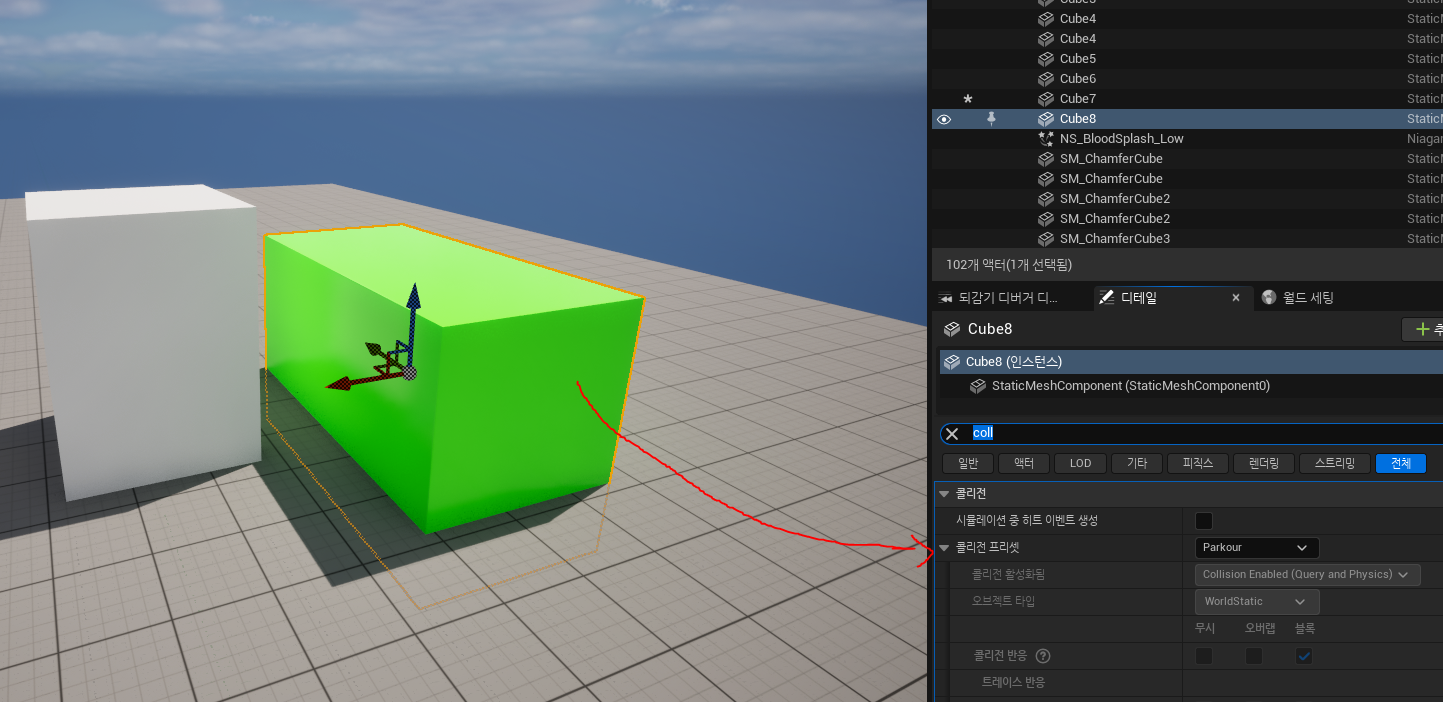
그럼 흰색(일반콜리전) 초록색(파쿠르프리셋콜리전) 일때 초록색만 라인트레이서에 감지되게 되어
해당 액터의 값만 계산하게됩니다
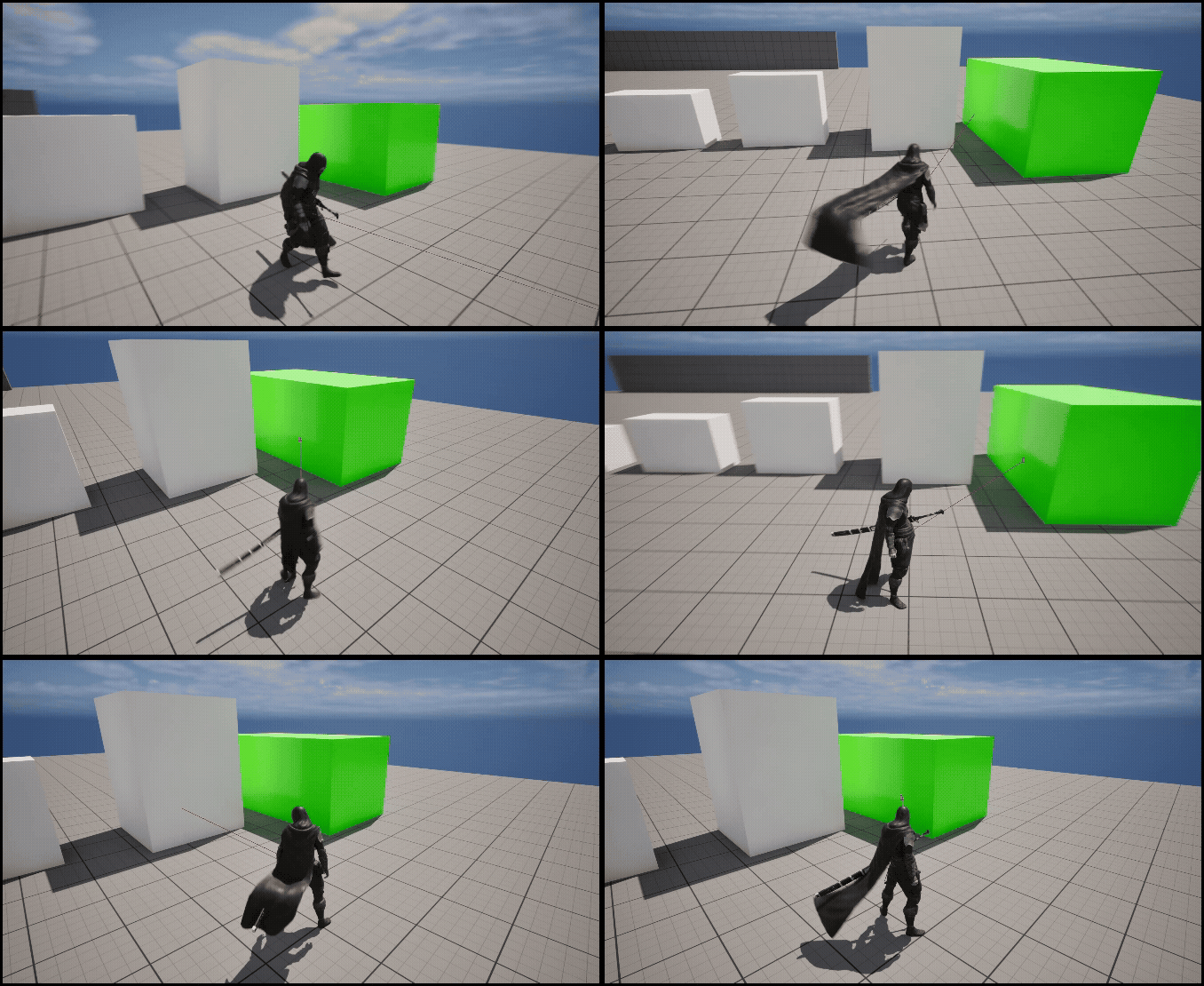
결과물
'Unreal 프로젝트 다이어리 > 두번째 프로젝트' 카테고리의 다른 글
| Unreal - 파쿠르 잡고 올라가기 (0) | 2025.10.31 |
|---|---|
| Unreal - CSV 데이터 테이블 만들기 (0) | 2025.10.29 |
| Unreal - 적 타게팅 (0) | 2025.10.29 |
| Unreal - 캐릭터 회전 (0) | 2025.10.19 |
| Unreal - Posture Progress / Hit Direction (0) | 2025.08.29 |