설계방향
게임플레이를 진행하면서 보여질 위젯 즉 UI 를 작업해보겠습니다
전 프로젝트를 거치며 플레이어의 위젯은 플레이어 컨트롤러에서 띄우는방식이 옳게된 방향성인것을 알고
MainWidget은 플레이어 컨트롤러에서 띄우도록 하겠습니다
MainWidget은 플레이어 화면에 띄워지는 여러가지 위젯을 한번에 보여지는
"위젯 컨테이너" 의 역할을 합니다
StatComponent에서 가지고있는 값들로 위젯을 초기화할텐데
해당 위젯들은 컴포넌트내에서 구독 방식으로 위젯을 업데이트하는 함수를 호출합니다
1. UI 기획안 짜기
1인개발이라서 기획도 전부 혼자 구성해야했습니다
UI의 베이스는 세키로 라는 게임의 UI를 베이스로 삼되 여러가지 알림 위젯을 추가하여주었습니다
UI의 초기 배치, 디자인 구상도입니다
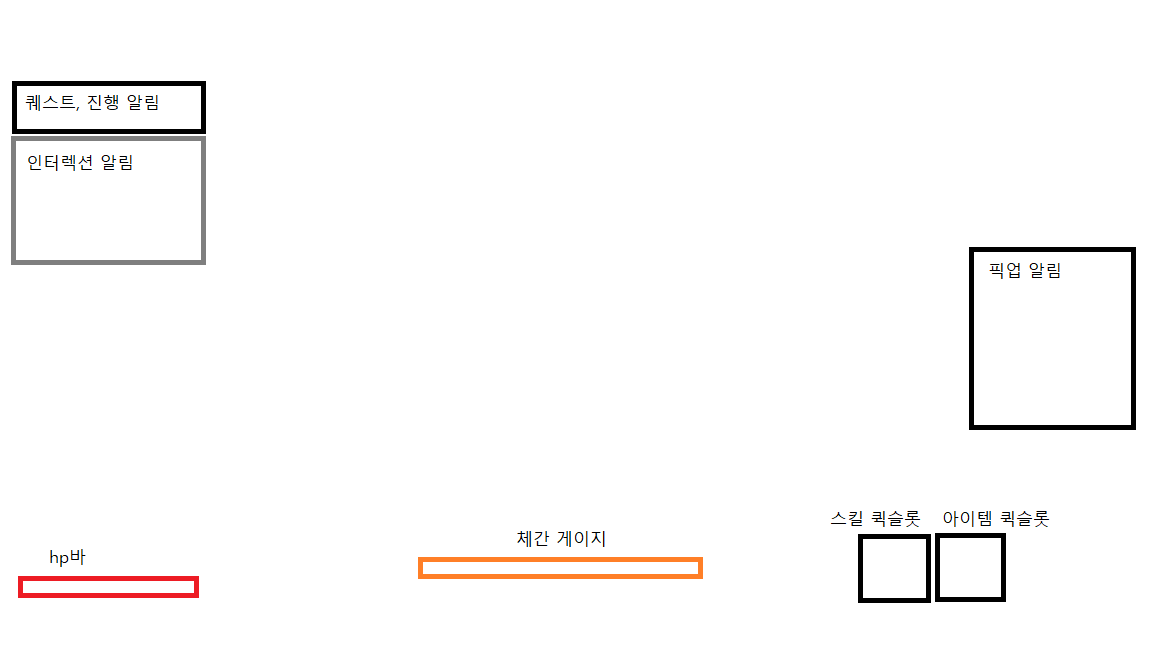
Widget은 컨테이너 역할을 하는 MainWidget을 제외하고
총 4가지 종류로 나뉜다
1. 캐릭터 상태를 나타내는 상태위젯
HpBarWidget
PostureWidget
2. 플레이어의 입력과 연관된 슬롯위젯
QuickslotWidget
3. 알림을 담당하는 알림 위젯
NotificationWidget
QuestWidget
InteractionWidget
4. 화면효과적 전역효과를 나타내는 효과위젯
ScreenEffectWidget
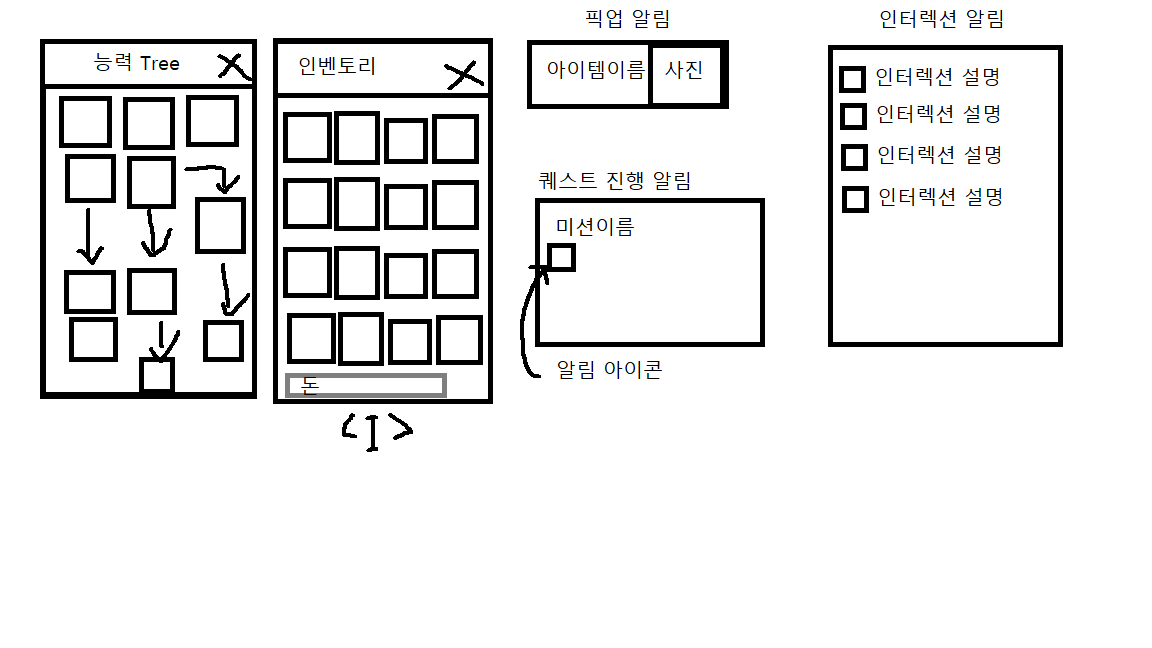
또한 I키를 누르면 보여지는 인벤토리위젯, 레벨에 따라 강화할수있는 능력Tree 여러가지 위젯 기초 구상도는 이와같습니다
2. Widget 구현하기
HPBar위젯, Posture위젯을 구현해보도록 하겠습니다
HPBar위젯은 플레이어의 HP를 기반으로 프로그래스바 형식으로 구현하였습니다
위젯의 하이어라키는 이와같습니다
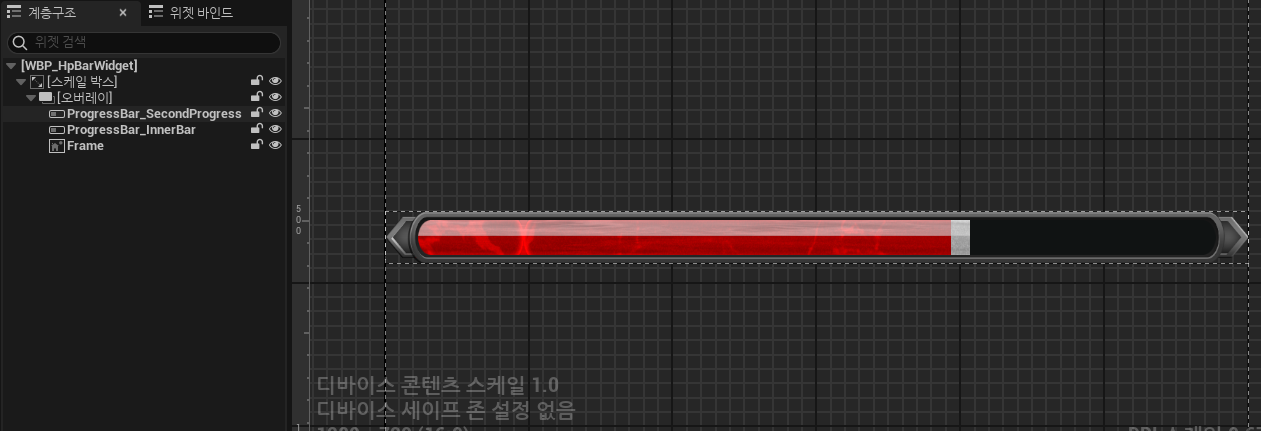
HpBarWidget
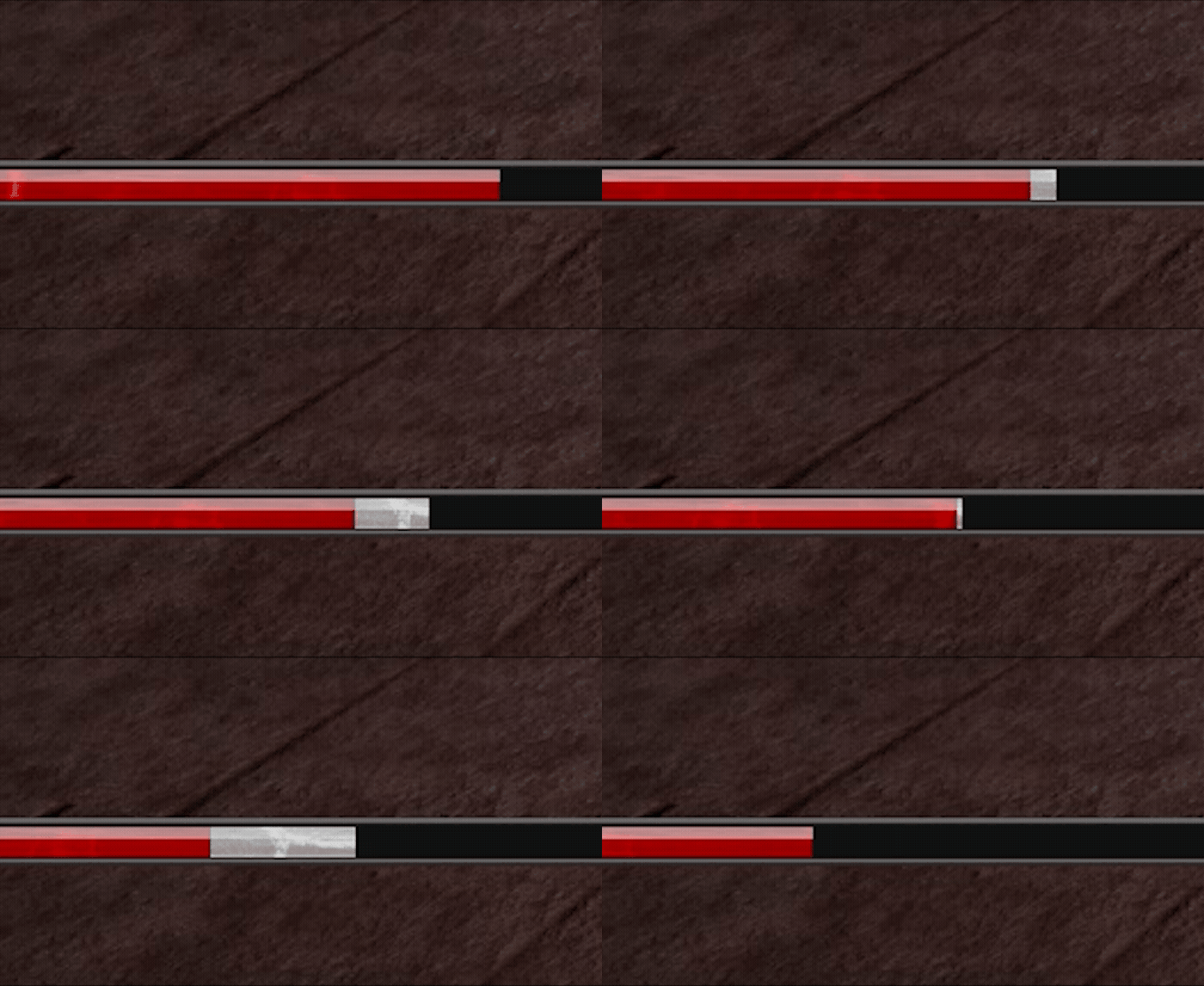
HpBar은 보조HP바가 목표 체력 비율까지 부드럽게 감소하도록 매프레임 보간하여 업데이트하는 함수를 만들어서
줄어든만큼 흰색게이지로 보여지게 설계하였습니다
void UHpBarWidget::UpdateSecondHPBar(float currentHp, float maxHp)
{
	if (ProgressBar_SecondProgress)
	{
		float barPercent = FMath::Clamp(currentHp / maxHp, 0.f, 1.f);
		ProgressBar_SecondProgress->SetPercent(barPercent);
	}
}

void UHpBarWidget::UpdateSecondHPBarStep()
{
	if (!ProgressBar_SecondProgress) return;

	currentSubHpPercent = FMath::FInterpTo(currentSubHpPercent, targetHpPercent, 0.016f, interpSpeed);
	ProgressBar_SecondProgress->SetPercent(currentSubHpPercent);

	if (FMath::IsNearlyEqual(currentSubHpPercent, targetHpPercent, 0.001f))
	{
		currentSubHpPercent = targetHpPercent;
		ProgressBar_SecondProgress->SetPercent(targetHpPercent);
		return;
	}

	FTimerDelegate timerDel;
	timerDel.BindUFunction(this, FName("UpdateSecondHPBarStep"));
	GetWorld()->GetTimerManager().SetTimer(th_subHPTimerHandle, timerDel, 0.016f, false);
}

void UHpBarWidget::UpdateHp(float currentHp, float maxHp)
{
	if (ProgressBar_InnerBar)
	{
		float hpPercent = currentHp / maxHp;
		hpPercent = FMath::Clamp(hpPercent, 0.f, 1.f);
		ProgressBar_InnerBar->SetPercent(hpPercent);

		targetHpPercent = hpPercent;

		if (GetWorld()->GetTimerManager().IsTimerActive(th_subHPTimerHandle))
		{
			GetWorld()->GetTimerManager().ClearTimer(th_subHPTimerHandle);
		}

		FTimerDelegate timerDel;
		timerDel.BindUFunction(this, FName("UpdateSecondHPBarStep"));
		GetWorld()->GetTimerManager().SetTimer(th_subHPTimerHandle, timerDel, 0.5f, false);
	}


}
Posture Widget
하이어라키는이와 같습니다
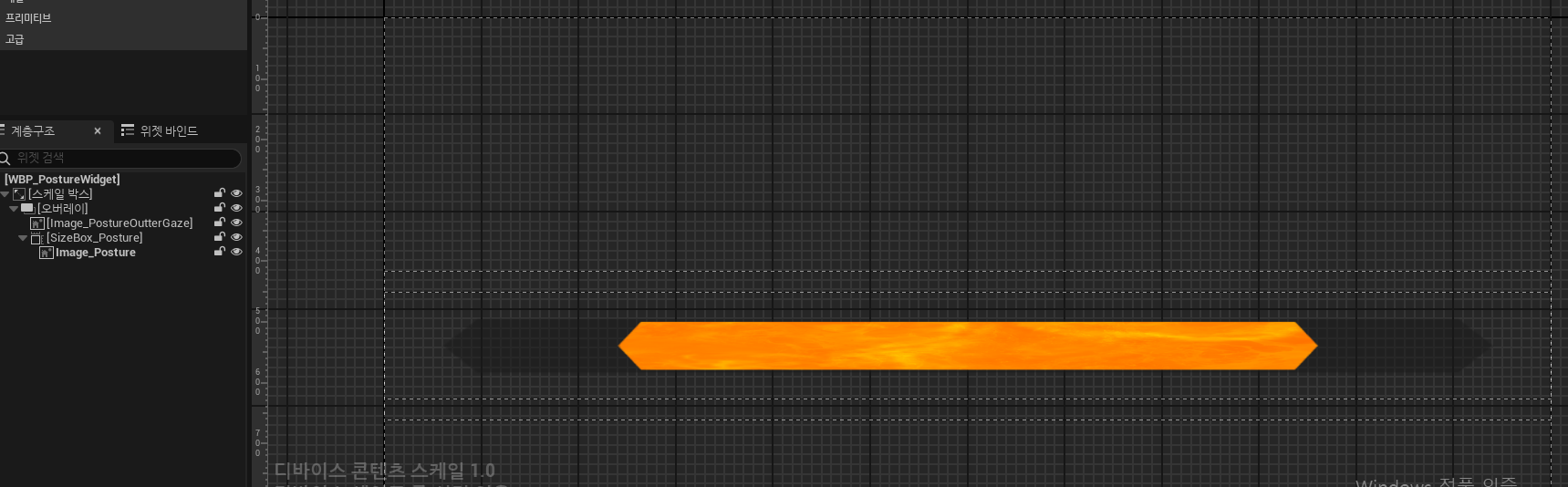
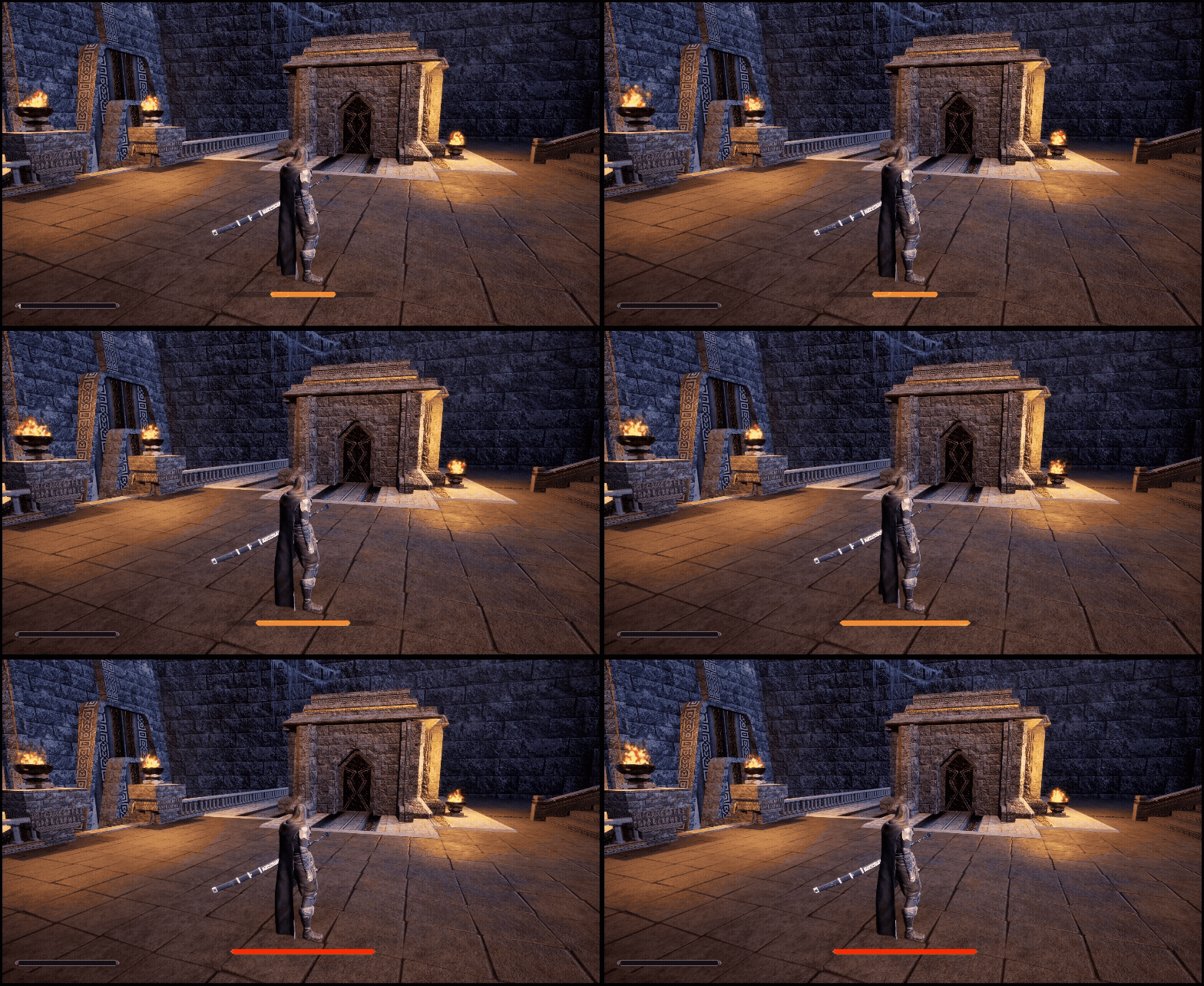
위젯의 Render x값을 키우거나 줄여서 체간값을 시각적으로 나타내었으며
크기에따라 색상을 변동합니다
void UPostureWidget::UpdatePosture(float currentPosture, float maxPosture)
{
	float posturePercent = FMath::Clamp(currentPosture / maxPosture, 0.f, 1.f);
	scaleX = FMath::Lerp(0.f, 1.2f, posturePercent);

	FWidgetTransform setTransform = Image_Posture->RenderTransform;
	setTransform.Scale.X = scaleX;
	Image_Posture->SetRenderTransform(setTransform);

	if (FMath::IsNearlyEqual(posturePercent, 1.f, 0.001f))
		Image_Posture->SetColorAndOpacity(FLinearColor(1.f, 0.088349f, 0.f, 1.f));
	else
		Image_Posture->SetColorAndOpacity(FLinearColor::White);
}
스탯컴포넌트에서 체력이 변할 때 델리게이트를 브로드캐스트하고,
위젯은 그 델리게이트를 구독하여 위젯의 UpdateHp같은 함수를 호출할수 있도록 구성합니다
DECLARE_MULTICAST_DELEGATE_TwoParams(FOnHpChanged, float, float); //currentHp, maxHp
DECLARE_MULTICAST_DELEGATE_TwoParams(FOnPostureChanged, float, float); //currentPosture, maxPosture

UCLASS( ClassGroup=(Custom), meta=(BlueprintSpawnableComponent) )
class PORTFOLIOMS_API UStatComponent : public UActorComponent
{
	GENERATED_BODY()

public:
	UStatComponent();
/// Widget----------------------
public:
	FOnHpChanged onHpChanged;
	float GetMaxHp() const
	{
		if (stats.Contains(EBaseStatType::Hp))
			return stats[EBaseStatType::Hp].EntryTotal();
		return 0.f;
	}

	FOnPostureChanged onPostureChanged;
	float GetMaxPosture() const
	{
		if (stats.Contains(EBaseStatType::Posture))
			return stats[EBaseStatType::Posture].EntryTotal();
		return 0.f;
	}
}
스탯컴포넌트에서
이 이벤트를 구독하면 값이 바뀔떄 자동으로 알림을 받을수 있도록 구독하며 발신자 역할을 합니다
void UStatComponent::UpdateCurrentStats()
{
	if (stats.Contains(EBaseStatType::Hp))
		currentHp = FMath::Clamp(currentHp, 0.f, stats[EBaseStatType::Hp].EntryTotal());

	// Posture
	if (stats.Contains(EBaseStatType::Posture))
		currentPosture = FMath::Clamp(currentPosture, 0.f, stats[EBaseStatType::Posture].EntryTotal());

	if (onHpChanged.IsBound())
		onHpChanged.Broadcast(currentHp, stats[EBaseStatType::Hp].EntryTotal());

	if (onPostureChanged.IsBound())
		onPostureChanged.Broadcast(currentPosture, stats[EBaseStatType::Posture].EntryTotal());

}
수신자 역할을 하며 statcomponent에서 값이 바뀌면 자동으로 메인위젯이 알림을 받습니다
void UMainWidget::InitValue()
{
	APawn* player = UGameplayStatics::GetPlayerPawn(this, 0);
	if (!player)
		return;
	statComp = player->FindComponentByClass<UStatComponent>();
	if (!statComp)
		return;

	//델리 구독
	statComp->onHpChanged.AddUObject(this, &UMainWidget::HandleHpChange);
	HandleHpChange(statComp->currentHp, statComp->GetMaxHp());

	statComp->onPostureChanged.AddUObject(this, &UMainWidget::HandlePostureChange);
	HandlePostureChange(statComp->currentPosture, statComp->GetMaxPosture());
}

void UMainWidget::HandleHpChange(float currentHp, float maxHp)
{
	if (hpBarWidget)
		hpBarWidget->UpdateHp(currentHp, maxHp);

}

void UMainWidget::HandlePostureChange(float currentPosture, float maxPosture)
{
	if (postureWidget)
		postureWidget->UpdatePosture(currentPosture, maxPosture);
}
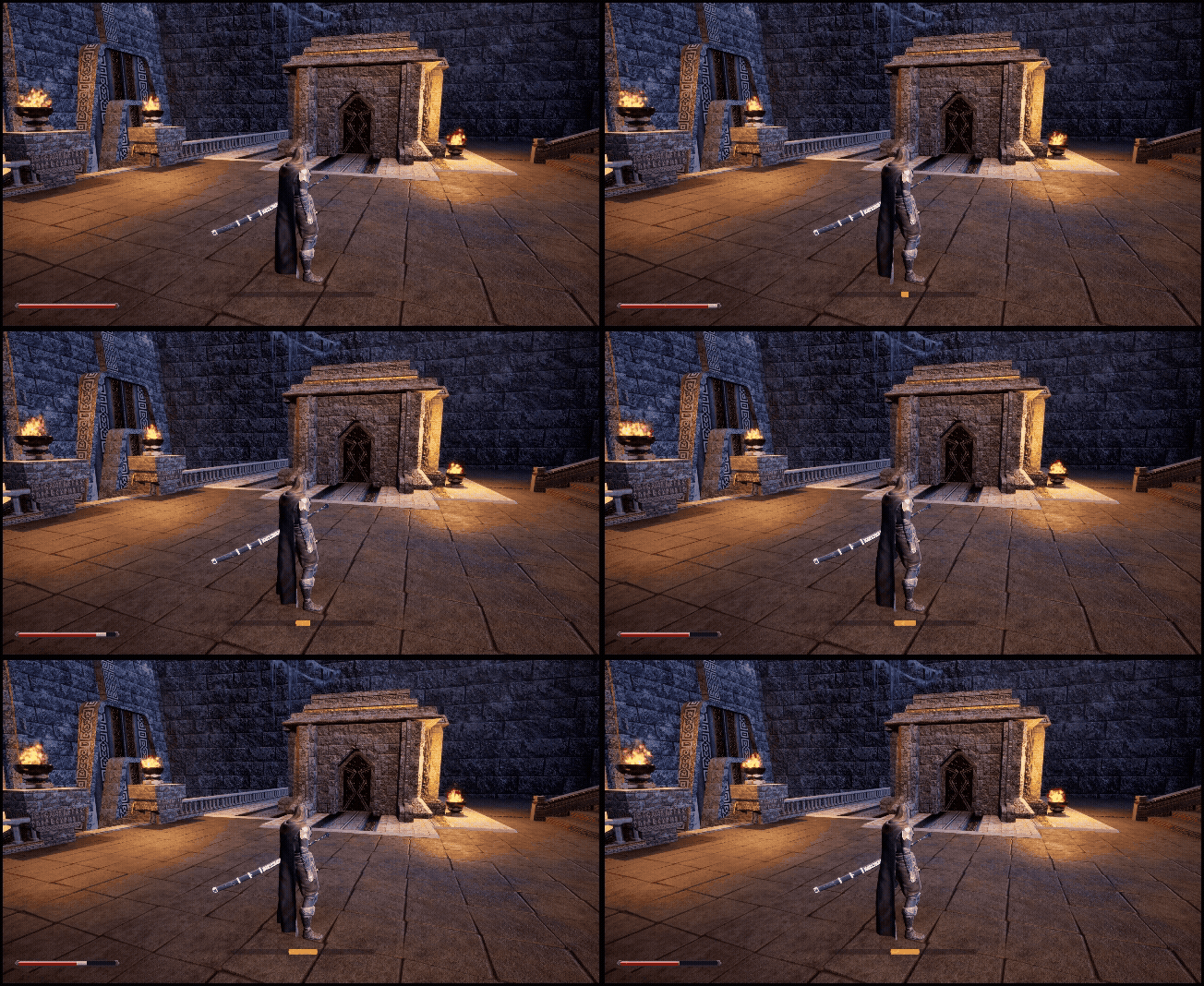
아직 AI를 구현하지않았기떄문에 0번은 데미지받기 9번은 힐하기로 연동하여주었습니다
(테스트코드)
void AMainCharacterController::InputKeyboard0Pressed()
{
	float damage = 50.f;
	EGuardType guard = EGuardType::None;
	mainCharacter->statComp->ApplyGetDamage(damage, guard);

}
void AMainCharacterController::InputKeyboard9Pressed()
{
	float heal = 30.f;
	mainCharacter->statComp->ApplyHeal(heal);
}
결과
'Unreal 프로젝트 다이어리 > 두번째 프로젝트' 카테고리의 다른 글
| Unreal - 인벤토리(2) ( 아이템 추가하기 ) (0) | 2025.11.23 |
|---|---|
| Unreal - 인벤토리(1) ( 크기변경하기, 창옮기기 ) (2) | 2025.11.22 |
| Unreal - StatComponent (0) | 2025.11.21 |
| Unreal - 상호작용(사다리 타기) (0) | 2025.11.15 |
| Unreal - 상호작용(승강기) (0) | 2025.11.12 |